Friday, October 12, 2018

Data Mine Reveals Personal Information


Image result for shocking
Image Source

Data Mine Search Reveals So Much


Shocking!!!

I can't believe all of the things that are digitally available about me!!!!   I find it absolutely scary that anyone can do a search, just like I did on myself, and use that information in any way they want to. It's no wonder identity theft and fraud are so common today. 


Image result for shocking
Image Source

What I found

I first began my search with who I am now by using my married name. The results first identified other Lori Rodriguez's that were about 10 years older. I discovered I needed to be more specific in my search by including my middle initial. The data found other people associated with me throughout my life. This included my husband, my parents, siblings, my siblings spouses, my aunt and a couple of people from my prior marriage. That was a bit surprising considering that was over 15 years ago. 

Next, I tried searching by using my married name with my middle initial in addition to my current city and state. My husband and I just moved to Lisle, IL a little over a month ago, but Nuwber found no results. I had to change my search to my maiden name and prior city location to gather results. With this change, the data focused on relatives from my prior marriage only. Venturing out through some other sources, I was glad to find my absence on YouTube, Intelius, PeekYou and BeenVerified, for example. Either I am living a sheltered life or these sights haven't caught up with the latest information on where I am or what I'm doing. 

                                                  
Image result for facebook instagram twitter
Image Source

I am actively on Facebook, Instagram, and Twitter. These social media sites are what connect me to friends, family, and resources for my job and hobbies. Because of my privacy settings, others can find me with basic information only. I was surprised to find that Google images didn't carry any photos of me, even from the social media sites that I am a part of. Furthermore, I was bewildered to not find information about my education, places of employment or activities/rewards that I've earned over the years. I wonder how people and their information are determined for selection to be on each site? 

Should This Skill Be Taught?

Image result for teaching research
I don't think this skill is something of value to be taught. I had a prior professor teach me this skill, but it didn't seem to have much value to me. I never used it again until now. I believe that if anyone really wanted to find information about someone, they would. Teaching school aged kids this skill would be difficult because there really wouldn't be any information out there on them unless they won some major events that have been published in the newspaper or other public news media. I would say it is more of any adult resource to be used in search of someone. 


Saturday, October 6, 2018

Educators Making Connections Through Twitter


Favorite Educator Resource on Twitter                


Educators Making Connections Through Twitter


Image result for twitter
Image Source


After participating in Twitter feeds for the last 4 weeks, I have grown fond of this social media network, but only for professional/educational purposes.  I enjoy reading through the feeds and reading others' findings and opinions. My favorite go to educational resource is Education Week. Their website is www.edweek.org. This resource is the newspaper and website of record in American education.  I find every tweet interesting and informative. Topics range widely, from national political issues to everyday topics like instructional ideas, student behavior discoveries and solutions, to everyday stories.  
Image result for ed week logo
Image Source
Image Source


PLN's (Professional Learning Networks) on Twitter

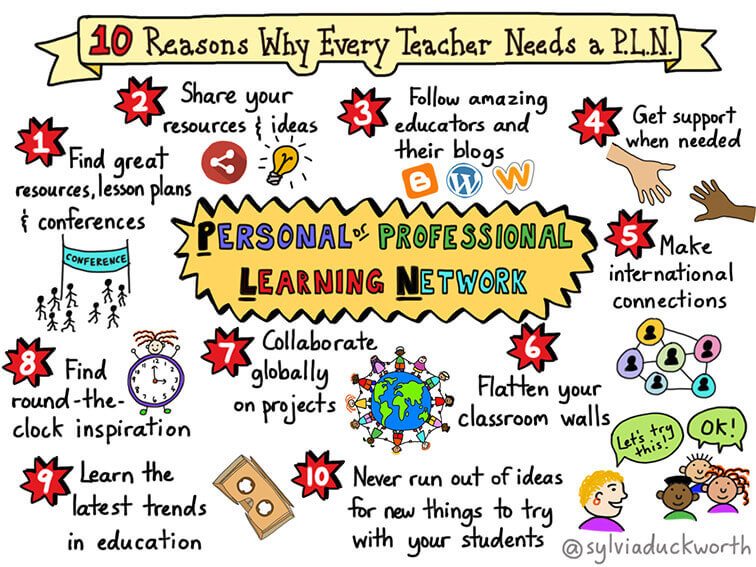
I am intrigued by PLN's!!  I've found so many networks that can be beneficial to my profession as an educator in making connections with other educators, learning new teaching strategies, and staying up to date on the latest news in education. I believe that with all of the resources out there, we, as teachers, have a large support system to be better educators and create better classrooms. Through #edchat, for example, teachers can freely share their thoughts, ideas, and encouragement. It reminds me of Facebook where people post their hearts and minds in a post. I mentioned Ed Week above as being my favorite and much more a "news" type of network. I attended a phenomenal Math workshop with Reagan Tunstall and love following her for new resources and ideas. Another one of my favorites is PBS Teachers.  I've used this resource mainly for their videos to show during a mini lesson and extension activities. Again, I am so thrilled to follow many networks that can help me become a better educator. Take a look at my Twitter and discover the many PLN's that I have found beneficial and interesting to our profession.  

10-reasons-syldckwrthc
Image Source

Follow me on Twitter


Friday, October 5, 2018

Exploring Web 2.0 Tools: LiveBinders


LiveBinders: Creating a More Organized Life

LiveBinders 101

Image result for organization
Image Source
LiveBinders is a tool that is all about organization. If you have a system already in place using binders and tabs, then this is an online version of that. Unlike the hands-on system, LiveBinder is all online, accessible anywhere you go without hauling a heavy bag around with you. It is FREE up to 10 binders and can be used in any profession needing organization. 

Benefits to an Easier Lifestyle

We all know that it takes so much time to fully get your work space organized just the way you want it. Then, you have all this stuff stacked around your work area to keep your organized supplies and files. Not only that, it takes a bit of time to then remember where something was placed during that organization process. Why not try something new to make life a bit easier!!  That is where LiveBinders becomes a necessity. 

Image result for easy lifestyle
Image Source

LiveBinder has many benefits: 
  • Loads of files in one place - Endless room to keep everything in one place
  • Easy to organize - Tabs and Subtabs to label and organize each file
  • Accessible anywhere there is Internet - Linked to your email account
  • FREE (up to 5-10 binders) - upgrade to more binders
  • One click to share with others - collaborate with colleagues, share with parents and students
  • Real Time Updates - Don't have to wait for an hourly/daily/weekly update.

Ways Educators Can Utilize


  1. Survival Tips/Resources
  2. Training
  3. Extra, printable worksheets/lesson plans
  4. Teacher Sites
  1. State Standards
  2. Resource Page
  3. Vocabulary/Assignments
  4. Extension Activities
  5. Subject tabs with practice
  6. Educational Games
  1. Employee Handbook
  2. Calendar
  3. Expectations/Policies
  4. Mission Statement
  5. Duties
  6. Schedules

  1. Instructions
  2. Subject Tabs
  3. Subtabs of Assignments

  1. Personal Learning Network (PLN)
  2. Blogs per specific educator role
  3. Image result for students and parents
    Image Source
  4. Subtabs under each blog

  1. Intro.
  2. Due Dates
  3. Assignments
  4. Projects
  5. Labs
  6. Vocabulary
  7. Videos
  8. Resources
** The numbered list for each utilized tool are examples and can be changed.


Getting Started:


  1. Click red button for FREE - Sign Up
  2. Sign up with Email/Google
  3. Fill in your information


Link to my audio PowerPoint of LiveBinder here

Thursday, October 4, 2018

Educational Technology Shows Us...

How does educational technology affect human interaction and self esteem?

The Findings!

Image result for creativity
Image Source
According to the article, "Social Media, Social Life: Teens Reveal Their Experiences," there are many positive and negative ways that social media affects teens. Right from a teen's perspective, social media can help them feel better when they are lonely or depressed, because there is always someone online to chat with. This in return makes them feel joyful. Social media is also a way for teens' to express themselves through displaying their creative pieces of art or by expressing their opinions in written words, rather than verbal. Quite often this saves teens from being rejected by their peers by allowing those interested to comment and appreciate the thought or creativity of a person. One in four teens attest to social media being vital to them in expressing their creativity.  As an educator, I find this fact important to teen health to be able to assert themselves openly about their likes, interests, and opinions. 

Image result for distracted
Image Source
Image result for hate speech
Image Source
On the other hand, there are some disadvantages to social media and how it can affect a teen. For example, many teens say that social media distracts them from their homework. We all know the result of being distracted while trying to accomplish something else more important: lower productivity and quality of work. I wonder what some students' grades would be like if they were shut off from social media during class time or homework time?  I've seen firsthand successful students whose parents provide them with restrictions and put school at a higher priority than most. Their productivity goes through the roof and they excel in the classroom and on state standardized tests. Now who wouldn't want that for their child?  Another negative affect that social media has on teens is the amount of harsh language, hate speech, and bullying that takes place. Two-thirds of teens can identify with seeing and/or experiencing one of those areas. It's no wonder teen suicide is on the rise, as well as clinical depression, and other social abnormalities. 

Research shows that in 2012, almost half of teens would say that they loved getting together with friends to communicate with them personally. Now, more than half of all teens would attest to social media removing them from personal relationships and diverting them from "being in the moment" with those around them. 

Thoughts?

I was only partially surprised by these statistics, as I have seen many of the affects in the classroom with students who sneak cell phones into their pockets or quietly go to noneducational cites while working on assigned activities on the computers. Just a student knowing a device is in their pocket distracts their focus. Rotating the classroom and monitoring student screens is the only other way to keep students on task that struggle with social media addictions. It is so important, as educators, to stay on top of the current finding of research and the behind the scenes activity that we wouldn't know otherwise. For example, I didn't realize all of the hate speech and harsh language that kids/teens are putting out there and exposing others to. I can't help but believe that these kids who are posting such things have a low self-esteem and it could be from what they have been exposed to in social media as well. It is beginning to sound like a vicious cycle. What else can we do as educators to prevent this?

Thursday, September 20, 2018

Active Learning with QR Coding


Active Learning with QR Coding

What is active learning?

According to the Center for Educational Innovation, “active learning is any approach to instruction in which all students are asked to engage in the learning process (2018). This can look different in many ways. There are several strategies that can be enforced to move students into active learning. Research shows that active learning is what gets information “stuck” in students’ minds to apply the objectives to future learning or situations. Below is a chart of the various strategies teachers can use to move students into active learning.

Active Learning strategies graph
Image Source

Active Learning with QR Coding

Image result for qr codes
Image Source
QR Coding is a strategy not listed in the chart above, but it is becoming more widely used in the active learning process for students. QR Codes are black and white bar codes that can be scanned to lead a person to information. They can easily be made using a QR code generator. This tool can be used in any subject as a way for students to use technology to enhance their learning. For example, during Daily5, one station could be where students have to scan QR codes with the tablets to discover the antonyms for new vocabulary. In Math, students can use a QR code to check their answers to problems they have already solved. This allows for student independence and less time for them waiting in line for the teacher to check their work. Furthermore, teachers can spend more time with the students who are struggling with the objective and provide extra support, while others move on with their work or extended activities.
QR coding engages students in active learning by allowing them to independently use a tool to further their learning. Many educators are realizing that any form of technology is what gets students excited about learning these days. Outside of school, so much of how students spend their time is within the realm of technology. The key to active learning is independence. Research shows that students remember 90% of what THEY do. Not what a teacher tells them in a lecture or shows them in a video, but what the students actually do on their own. This provides each child with permission to be responsible for what they do with what is put in front of them. This is active learning!

So…what should we as educators do?

I believe that we, as educators, need to include active learning strategies in as many of our lessons as possible. If this is what is going to get our students to really learn information and apply it, the chances of improving student performance and test scores are going to be very high, as well. Now, who wouldn’t want that!  In my classroom, I have used many of the active learning strategies in the chart above. The students’ responses to the activity are priceless!  They voice how much fun the activity was, and I can see that some of my usuals are not secluding themselves out of boredom. Yeah, sometimes we still must do a little lecture here and there to activate prior knowledge or provide background information, but most of our efforts should be in getting students engaged in their own learning.


Image result for active learning
Image Source


Check out a snapshot of QR Coding here on Padlet. 


Wednesday, September 19, 2018

Image Source


Trends in Educational Technology

Online Courses      

There are so many companies and universities offering online courses to further one's education or improve their current skills for employment. I've created a presentation on the M.O.O.C. What is that, you may ask!!  Please watch my presentation here to learn more!

Image Source

Thursday, September 13, 2018

Being Digital: What it Looks Like in My Life


What do you mean "being digital?"         


Being Digital: What it Looks Like in My Life


Image result for digital life
Image Source
That is a great question!! Being digital in today's world means using technology in various areas of our personal and professional life. Think about all of the times that you reach for your computer, tablet, smart phone, or other electronic device to communicate, research, or do both. You are being digital! Not many reach for that paper and pen, these days, to take care of business. Well, maybe there are a few sticky note kings/queens out there like me! Even so, I don't use the notes to communicate or find information. That's another topic for another day. 

Mapping It Out!

Image result for digital devices
Image Source
When it comes to evaluating your time spent on the Internet, there is a tool you can use to make it easier to organize. It is called a "Visitors and Residents Mapping App." Within this app, you can create shapes/colors in any of the 4 quadrants to represent your digital use. What do I put in each quadrant, you may ask?  The top, left quadrant represents digital use as a Personal Visitor. A Personal Visitor uses the web as a tool only for personal use. The bottom, left quadrant is the digital use used as an Institutional Visitor for searching the web for work/business. The top, right quadrant represents a Personal Resident who uses the web to communicate with others on a personal level. Finally, the bottom, right quadrant is for Institutional Residents who use the web to communicate mainly for business/work purposes. For more details on Digital Mapping, visit David White here. So go ahead, give it a try!! Map out your digital world. 

What I Learned from My Map

Image result for time
Image Source
Looking at my digital map was eye opening! I realized that I use the web mostly as a Personal Visitor. Many of the digital sources I use in this quadrant are for traveling or for preparing to be a new mom. These sources are where I find the information I need to go about my current season of life. The Institutional Visitor space is really for those things that I "have to have" for working part-time and going to grad school. the Personal Resident box is where I do spend a lot of my time also on the few sources documented there. I don't need a lot of different sources to communicate with those closest to me. Furthermore, the Institutional Resident quadrant is currently used as a way of communicating with others for school or church. Concluding on my digital map, I may need to reconsider the amount of time I am on the web, as it seems to be a bit much for my taste and view of a healthy lifestyle.